






 Settings
 Fast Delivery
 Free Shipping
 Incoterms
 Payment Types


 Marketplace Product

Developing an Android-Based Embedded System
Contributed By Electronic Products
2014-03-12
The open-architecture Android platform has been tremendously successful at capturing the largest share of the smartphone market. Backed and acquired by Google in 2005, the Android operating system can be found in over a billion phones and tablets since it’s unveiling in 2007, and it is poised to continue expanding its reach with the emergence of “Internet of Things” embedded solutions.
One key accelerant driving Android’s acceptance is the Open Handset Alliance, which keeps hardware, software, and telecommunications well defined through open standards. Also helping to ensure the success of the Android OS is its relatively intuitive user interface, which takes advantage of touch and gestures to provide a higher-level link with users. What’s more, improved speech recognition, multiple and flexible communications links, vivid high-definition displays, and camera modules offering beyond-the-norm resolution are just a few of the features helping to make Android-based products successful.
What does this all mean to the designers of equipment and user-interface systems? This article looks at the elements of an Android design and discusses the engineering approaches, resources, tools, and reference designs available to help you develop Android primary and/or add-on hardware. All parts, development tools, training, and other resources referenced here can be found on the DigiKey website.
Open vs. closed source
The battle between open and closed source has raged over several generations of design. Closed source means that a smaller set of innovators are let loose to create, as development resources and licenses mean more of a commitment for designers. Open source lets everyone develop product under an umbrella framework, usually for free or at very low cost. Closed-source products often seem to work better right out of the chute since (usually) a more disciplined team is behind them.
However, there is no denying that the low cost, sexy screens and user interfaces, and app diversity have pushed Android sales well beyond that of the nearest competitor, Apple’s iPhones and iPads. Manufacturers such as Samsung with its Galaxy-class products and a cornucopia of nontraditional hardware companies including Barnes and Noble and Amazon are offing various flavors of Android bundled with numerous features and apps.
This means two things. One, we can design our custom hardware as a lower-cost add-on to an OEM Android, and use the Android system for our display, communications link, and user interface. Alternatively, we can design an embedded Android system that tightly couples our dedicated hardware or proprietary systems and take better advantage of open-source resources, as well as becoming hardware agnostic, allowing us independence when choosing our next generation processors, modules, boards, or OEM tablets, as long as they conform to the Android requirements.
What’s needed
As capabilities and features improve, the minimum requirements will change. Modern Android designs require at least the horsepower of a 32-bit ARM7, MIPS, or x86 architecture, with at least 512 Mbytes of RAM. The processors must be able to run the memory-management scheme that keeps processes open, but can be suspended to save power.
There is a lot here to digest. It is not an easy task to have a single processor, even running at 1 GHz, manage and direct the many real-time sensitive and often overlapping functions such as graphics processing, accelerometers and other sensors, projected capacitance touchscreens that can recognize gestures, video cameras, USB, GPS, Wi-Fi, Bluetooth, and Audio I/O, to name just a few.
When developing an Android-compatible hardware platform design, you might first look to the chipmakers that provide the ARM, MIPS, or X86 processors that can support and run the Linux-wrapped OS underlying the Android personality. However, when you do, it is also wise to keep in mind that in addition to the high-end gigahertz-class processors, smaller, integrated, and dedicated processors and coprocessors also exist and these can offload many of the processes competing for attention and resources.
Take as an example the FTDI FT311D-32L1C-R dedicated USB Android enumerator and communications link controller. Called a USB Android Host IC, it is specifically designed to allow peripheral hardware access within an Android system through USB.
The Android Open Accessory Mode (OAM, on OS 3.1 and onward) allows external devices with USB hardware to interact in a special accessory mode. Power from the external device is used so the tablet or smartphone does not have to provide the 500 mA needed to satisfy USB as a host-side controller. In this mode, no drivers, software, or overhead is required on the Android machine.
The relatively small, 32-pin FT311D handles the entire USB enumeration sequence and supports the Android Open Accessory Mode as an independent coprocessor (Figure 1).
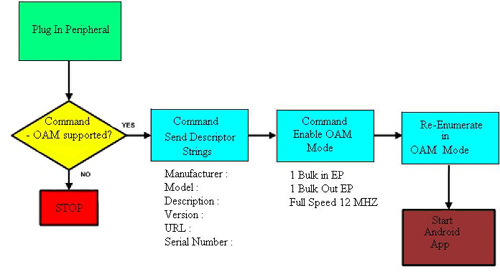
Figure 1: By offloading the responsibilities of the Open Accessory Mode, the coprocessor handles all the enumeration and re-enumeration without the need for any drivers or overhead from the Android processor.
Supporting USB 2.0 12 MHz speed, it can unburden the main processor by relieving it of all the USB-centric responsibilities, especially when connecting its peripherals to USB. FTDI provides an Android Interface Solutions Product Training Module on the DigiKey website.
Microchip, maker of the PIC processor, also supports the popular Arduino platform. With Android development in mind, Microchip offers its DM240415 Accessory Development Starter Kit based on PIC24F processors. This also provides a dedicated coprocessor approach to offload critical links and functions like data transfer to and from an Android via a microcontroller or USB with OAM in mind.
The royalty-free, no-license-fee DM240415 Accessory Development Starter Kit provides an embedded debugger, power supply, and software supporting graphics libraries, IrDA stacks, USB stacks, flash-disk-drive file system, capacitive touch software, TCP/IP stack, and MiWi personal Wi-Fi support. For interfacing custom hardware to an Android system, the board also features eight status LEDs, a potentiometer, and user-interface buttons to help as an application development and test board. A reference schematic[1] is provided, as is a tablet reference design. The Android Client Driver is implemented as a layer above the PIC USB Host Stack (Figure 2).
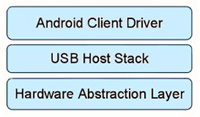
Figure 2: The royalty-free software for Android OAM mode provided by Microchip builds on its USB stack by adding an Android Client Driver.
Both FTDI and Microchip provide development support for their devices, but development support can also come from third parties. Embedded Artists provides an open-source demo and development board with its EA-APP-001 Android Open Accessory Application Kit. Following the same split processor task management distribution scheme, it uses two coprocessors; the NXP Semiconductors LPC1769, a higher-end 32-bit 120 MHz ARM® Cortex™-M3 device combined with NXP’s LPC11C24, a smaller 50 MHz 32-bit ARM Cortex-M0 part to distribute higher and lower level processing tasks into parallel operational streams.
The LPC1769 side can support 10/100 Ethernet, CAN, ZigBee (NXP Jennic), and serial tasks. The LPC11C24 side shares a CAN interconnect, but also manages hardware development and sensor interfacing with its RGB LEDs, pushbuttons, and temperature and light sensors. It can also test low-power wakeup development through one of its low-power I/Os (PIO1_4).
A nice feature is the charger feed-through mode. In addition to an alternative 5 V power source, the USB-style charger interface extracts power from the unit under test (Figure 3). A prototyping area is available to allow you to access USB data signals and the OAM mode through the chargers. A charger can then automatically sync images and music over Wi-Fi while it is charging. NXP’s LPC1700 Series Product Training Module is available along with NXP’s LPC11xx Code Density Product Training Module.
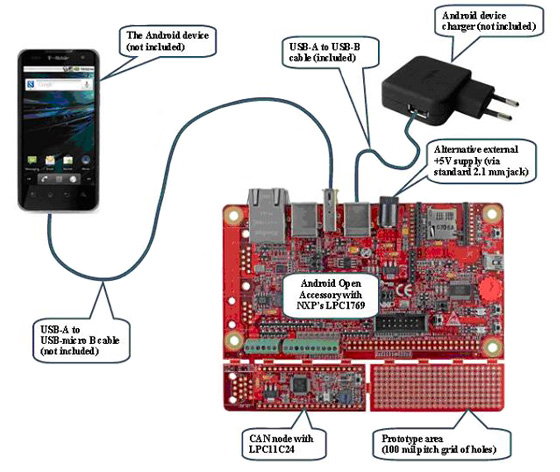
Figure 3: Dual coprocessors can distribute Android-associated peripherals and tasks, as well as act as a platform for Android hardware add-on development.
Born to run
In addition to peripheral development and OAM support, board-level systems and reference designs as well as development kits are available that run high-end gigahertz processors for the main Android applications. Take a look at the ARM Cortex-A8-based 1 GHz Olimex A13-OLINUXINO-MICRO board for Linux-based Android development. Based on the Allwinner SoC, this is one of the OLinuXino gigahertz-class processor boards based on various processors (A8, A13, MX233, and more) you may want to use for higher-end control (Figure 4).
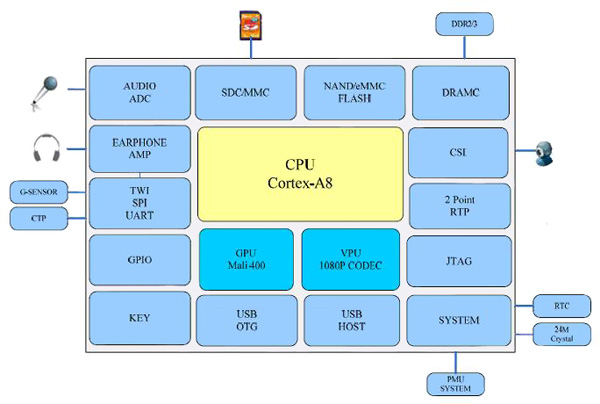
Figure 4: The highly integrated Olimex Linux Android development platform, based on the Allwinner A13, uses SoC technology to provide high performance, low power, and Android-friendly compatibility.
At these speeds, single- and multi-core processors can absorb all the overhead of the different peripheral functions and directly take on data and/or process-intensive tasks like NAND Flash, DDR RAM, SD cards, 3-D graphics, USB, and more.
Olimex also has a 1 GHz ARM Cortex-A8-based A10S-OLINUXINO-MICRO Linux board, which is an open-source single-board Android/Linux minicomputer. This board includes USB 2.0 support and HDMI graphics, and supports VGA TFT resolution. It also provides 50 I/O lines for assisting in developing your own native hardware and interfaces.
Overall, the Android processor block can be looked at as a next-generation embedded processor with a standardized set of peripherals, functions, features, and open-source code. Its high-level performance and design options may let Android systems become a new, widely adopted user interface for equipment makers, and it opens the door for OEM Android systems to become a valuable component for embedded designers.
For more information on the parts discussed in this article, use the links provided to access product pages on the DigiKey website.
References
Disclaimer: The opinions, beliefs, and viewpoints expressed by the various authors and/or forum participants on this website do not necessarily reflect the opinions, beliefs, and viewpoints of DigiKey or official policies of DigiKey.











 Austria